
DevBlog: Project Onboarding Preview: Project Intake Without Side Doors
Updates on Project Onboarding, a Built on Workday app that moves Workday project intake inside the tenant, and closes a real governance gap.

Most Workday customers do not have a project intake process. They have three or four, and none of them run in Workday.
Forms sit in SharePoint, or Smartsheet, or ServiceNow, or a tool one business unit bought on its own. Data gets exported and re-keyed, or pushed through an integration somebody built two admins ago. By the time a project record exists in Workday, the request that created it is a row in a system your security model has never heard of.
That is the gap Project Onboarding was built to close. This is a preview of what to expect from the new Built On Workday offering.
Where the governance gap opens
When project intake lives outside the tenant, the decision to create a project is made somewhere your Workday audit trail does not reach. Approvals are captured in a foreign tool, and the Workday Project business process, the control that was supposed to govern this, gets triggered by an integration account after the fact. Cost center and requester are re-keyed by hand, so the project starts life with data nobody validated against a worker record. Sensitive scope and funding detail passes through systems that sit outside your Workday security configuration. And because there is no native status, requesters call the PMO to ask where their request stands, which is how a governance gap turns into an administrative one.
When we developed this solution we focused on providing a small, but powerful addition to a Workday environment that was sure to have an impact. It needed to work seamlessly with existing processes, respect security boundaries, and reduce administrative overhead. The goal was to empower employees to initiate projects without compromising governance or security. To achieve this, we designed a dedicated project request interface that abstracts the complexity of the underlying business process. This interface guides the requester through the necessary steps, ensures that all required information is captured, and enforces compliance with organizational policies.

What unification changes
Project Onboarding is a Built on Workday app, available for all Workday customers to purchase and implement with little effort. It introduces a new object called the project request. It is a full Workday record from the moment it is created, can be secured and reported on. Nothing is replicated, nothing is moved, and nothing has to be reconciled later.
The Project Onboarding Hub allows employees to see their own requests and where each one sits. They can also easily initiate a new one: Name, cost center, and request date come pre-filled from their worker record. They add what only they know: the need-by date, a description, a justification, and any supporting documents. Embedded policy and support information states what happens next and the review window, so a follow-up is no longer necessary.
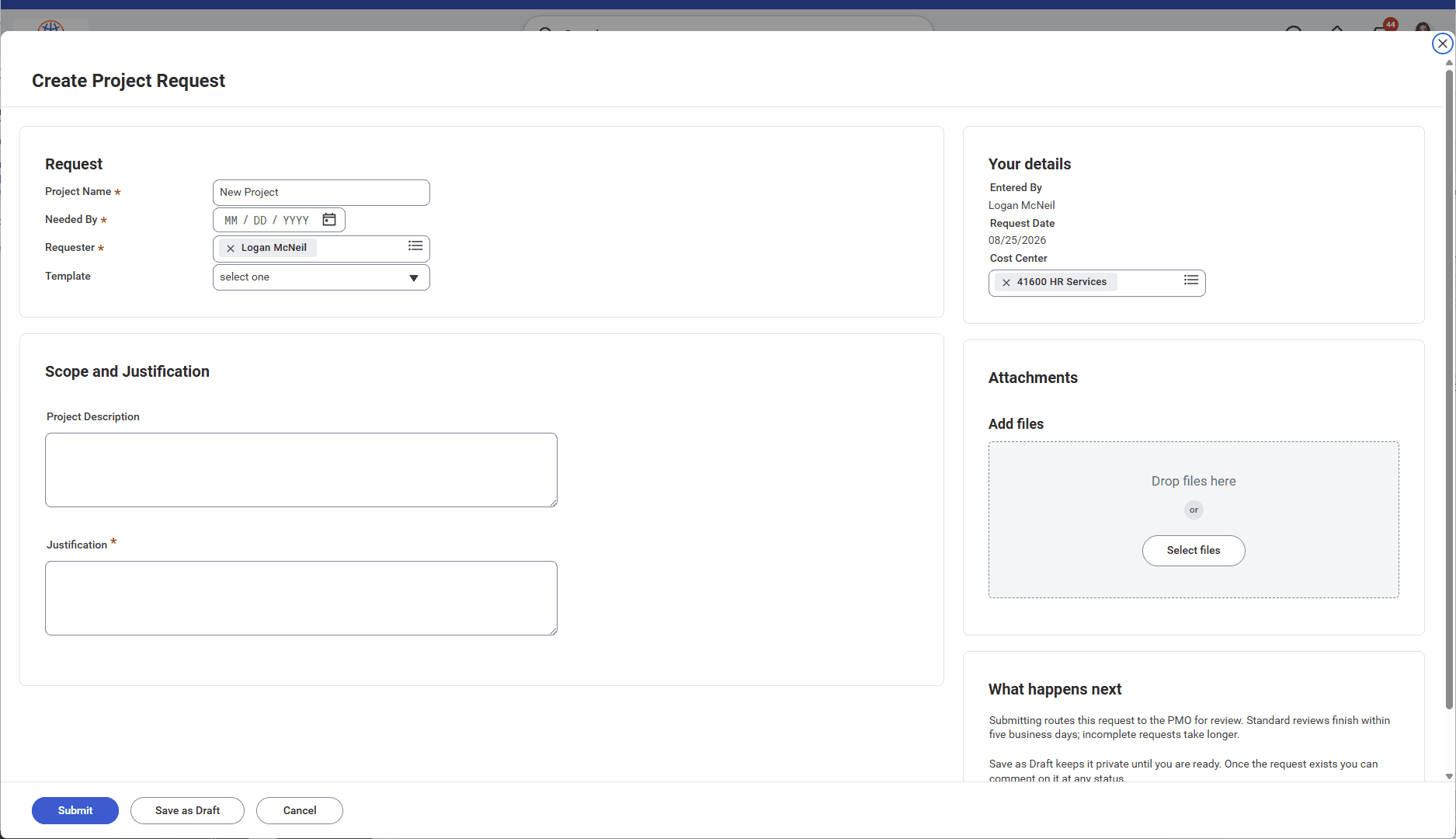
Upon submission, the app triggers a dedicated business process workflow. This BP can be configured to route or trigger different actions based on the acquired parameters. The approval routing, delegations, escalations, and security policy all are configured like any other BP. Approvers approve in the same inbox they use for everything else with the ability to quickly retrieve all detail information. Reporting sits alongside native Workday data.
To provide guidance to infrequent requesters, the policy page holds tenant specific information and instructions. The rules that govern project intake, the eligibility criteria, what gets declined, and who maintains the policy, live one click from the form instead of on an intranet page nobody opens.

The security aspect is worth highlighting, because it is where "unified" earns its keep. Requesters who cannot create a project directly can still file a request, because the right to ask and the right to create are separate grants. The admin queue is secured to its own domain.

Who should consider installing Project Onboarding
- You need Workday Projects configured and an active Create Project business process. The app triggers yours; it does not replace one.
- Organizations with use cases for Marking spend, Research projects, Investment projects, Capital projects, or lightweight PSA are good candidates
- Your organization values governance and security in project initiation, and you want to leverage Workday's existing security model and business processes.
- You want to reduce administrative overhead and streamline project intake without compromising on compliance or control.
- Your organization is looking for a solution that integrates seamlessly with existing Workday processes and leverages the platform's native capabilities.
- Out of the box, Project Onboarding handles project initiation only. You can integrate with Jira, MS Project, or Smartsheet via a BP steps.
Where it goes next
The current release covers submission, business process routing, status visibility, attachments, collaboration, policy, and the admin queue. Configurable templates and AI assistance on the description and justification fields are the two capabilities in front of us, and the order they land in gets decided by our pilot customers.
If your project intake runs outside Workday today, the fastest governance win is not a better form. It is putting the form where the security model, the business process, and the audit trail already are. Product Page
Let us know if you are interested or would like to receive more information.